Quickly deletes malicious files from your PC
FileASSASSIN is a useful, lightweight, and reliable tool that lets you delete locked files from a Windows computer and remove malicious files infected with malware.
Top Recommended Alternative
Evem if you have the best antivirus apps, you might overlook a threat to your system and have malware residing in system files or other critical folders. It can be a hassle to remove them, because of their self-protective elements.
However, FileASSASIN can unlock, delete, and get rid of these files in seconds. Since the program is also available in a portable version, you can choose to skip the installation process as well.
Hassle-free usage, lightweight program, and simple interface
File Assassin is a freeware software program, specifically designed to delete locked files on Windows PCs. The program is able to detect malware located in such files and remove them in little time. While the installation package is already lightweight, you can also install the tool’s portable version.
It comes with all the necessary files, which can be loaded directly from an external drive, such as an external hard disk or USB flash drive. Both versions feature the same simple interface, so you don't have to worry about a steep learning curve or technical knowledge.
What about the interface?
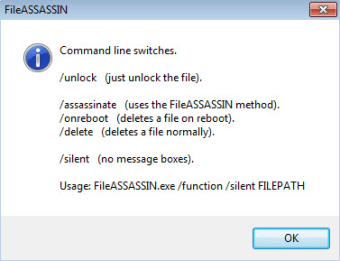
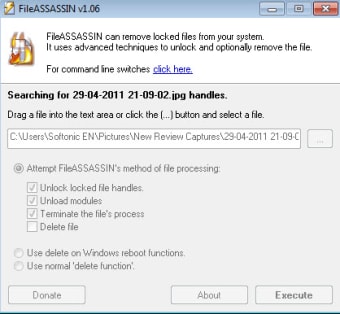
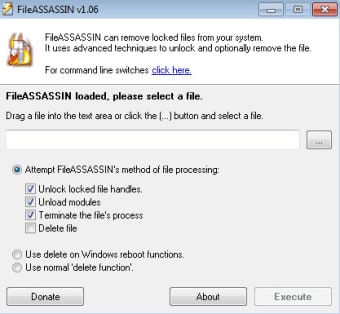
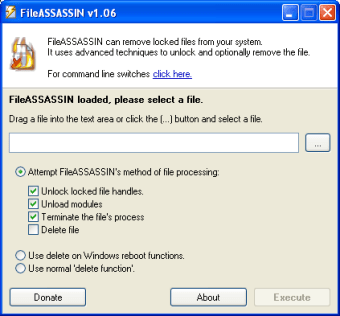
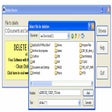
With a straightforward and minimal look, the main overview windows boast all the functionalities available in the application. In other words, you don’t need to shuffle between multiple configuration screens or menus. On Windows PCs, files are removable in different ways. For instance, you can use the Windows reboot function, which comes with a delete feature. You can even use the normal delete function available in the operating system. Unfortunately, these simple ways can be ineffective for locked files.
Then, there is FileASSASSIN’s method of file removal. It unlocks the files, unloads modules, and terminates the files’ backend processes to ultimately eliminate the hard-to-delete files. Since the program doesn’t need any technical skills, the developer hasn’t included a ‘Help’ file. Most importantly, this tool doesn’t affect system resources or cause any lags or crashes.
How does it work?
While you can download this file remover as a portable version, the installer comes with its own set of benefits. For example, when you install the program on your computer, it integrates the unlocking features to the Windows Explorer’s right-click menu, making it more convenient to access some useful options. The portable version doesn’t add these entries to the Windows Explorer, which you can only use from the default interface.
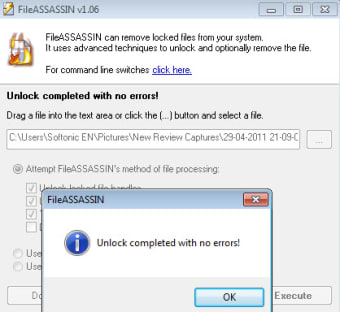
With the installed version, you can easily drag and drop folders and files into the main window. You can also load them via the file browser. As mentioned earlier, File Assassin uses several methods to unlock the files, so you’re able to delete or modify them without disruptions. In particular, the software unlocks file handles, unloads specific modules, and terminates multiple file processes to ensure deletion.
If you don’t want to use some options, you can disable them with a couple of clicks. For instance, if you don’t need to terminate the file’s processes, you can deselect this option. The program gives you checkboxes for every action, which you can select or deselect based on your preferences. In case you don’t select the ‘delete files’ option, the tool only unlocks the file and makes it possible to rename or move the file once again.
Another good option that the program offers is the ability to delete the file on the next system reboot. FileASSASSIN automatically remembers what you selected for deletion, and tries to remove these files when you restart the system. Because of this, you can execute the process, wrap up your work, shut down the computer, and everything will be in order whenever you start the system again.
Where can you run FileASSASSIN?
The software is compatible with different versions of Microsoft Windows, including Windows 10, Windows 8, Windows 7, Windows Vista, and Windows XP.
Are there any alternatives?
While FileASSASSIN is an excellent file removal program, there are plenty of alternatives you might want to consider. For instance, DeleteOnClick is a simple tool that doesn’t have any configuration options or interface. It’s available as an extra command, which you can add o the context menu. This means you’re able to safely delete files with a simple right-click.
Another good choice is LockHunter, a leading file remover for Windows PCs. The program gets automatically activated on locked files, informs you about the specific processes interrupting deletion, and stops processes to get rid of these files. Since the program sends the deleted files to the recycle bin, you can easily restore them, just in case you mistakenly deleted something important.
Delete Doctor is a lightweight application that doesn’t take much space on the system. While it’s still in the development phase, the tool is quite popular in countries like Egypt, Malawi, and India. This file remover is easy-to-use, effective, and gets the job done quickly.
FileASSASSIN is an efficient freeware app that erminates processes, closes remote handles, unloads modules, and gets rid of suspected malicious files. The simple interface, drag-and-drop functionality, and multiple features make it a solid choice for file removal. Once you start using the program, you won’t be disappointed.
A reliable file removal software program for Windows PCs
Developed by Malwarebytes, FileASSASSIN is one of the most reliable programs to delete files. It not only unlocks files but removes them completely from the system.
With the simple and clean interface, you only need to focus on the drag-and-drop mechanism to get rid of files. These features apart, though, the interface could benefit from some subtle improvements. Some users have reported unexpected crashes while using the drag-and-drop feature. Overall, File Assassin is an excellent tool for your Windows PC to keep the system secure and clear disk space.